
Why Scrivener is My Favorite Novel Writing Software
- Sydney Lauro
- Aug 23, 2023
- 3 min read

When I started writing novels as a kid, I exclusively used Microsoft Word. And for awhile, I stuck with that. If it's not broke, why fix it, right? But then someone recommended Scrivener. Although Scrivener isn't exclusively for writing novels, it has completely changed the game for me. Now, I can't imagine not using this novel writing software.
The Benefits of Using Novel Writing Software
Before I wax poetic about Scrivener, let's talk about why you might want to consider ditching Word for something more powerful.
Novel writing software is any platform that helps you create, organize, edit, and format your novel.
Great novel writing tools will also allow you to export your manuscript in the various industry-standard formats that you'll need.
What is Scrivener?
Scrivener is a word processor designed for creatives. Whether you're writing a novel, memoire, or screenplay, it's the software for you.
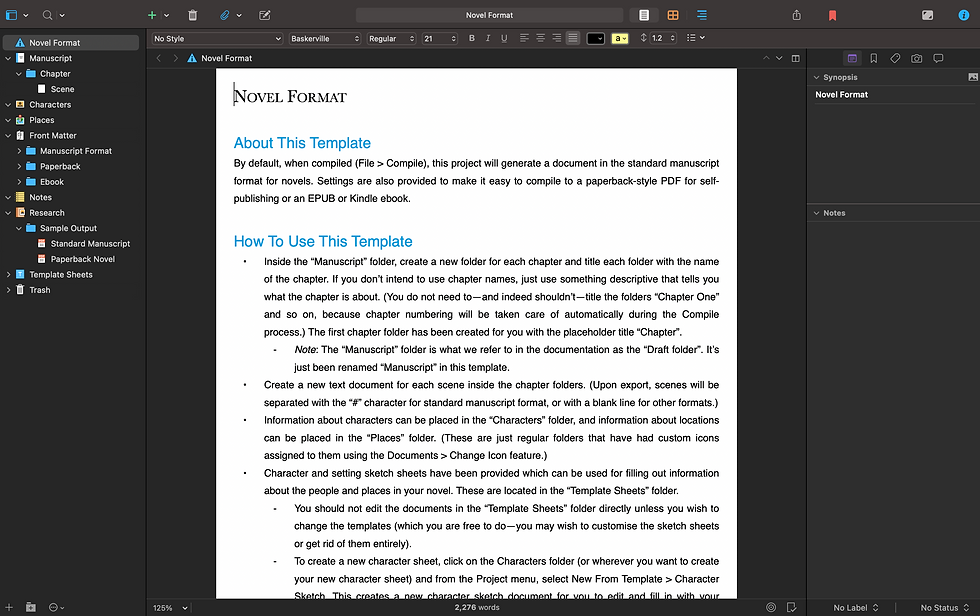
As a novelist, I exclusively use Scrivener's "Fiction" templates, which are set up to help you stay organized when writing.

Once you select your template, you'll see the real power of Scrivener's novel writing software. Unlike Word or Google Docs, Scrivener includes everything you'll need to write a novel:
Outlining. If you're an outliner like me, you'll be thrilled that Scrivener includes room for notes in multiple places and organize your research.
Character and location sketches. Scrivener comes with templates to create and document your settings and characters within the same document that your draft is in.
Synopsis. Each document you create within your scrivener template has room to write a short synopsis. If you're in the querying trenches, you know how painful it was to write your synopsis. This can help speed that process up.
Additional settings for organization. Scrivener includes the ability to add tags, images, and attachments so you can keep everything all in one place.
One of the best things about Scrivener is that it really is your all-in-one novel writing tool. Instead of jumping between multiple documents to find what you're looking for, everything's in one place. Instead of endlessly scrolling to find where you left off, every chapter or scene can be broken into it's own section.
Simple. Easy.
Why I Love Scrivener
Beyond the basic functionality of Scrivener (which, let's face it, is awesome already), there are other features that make Scrivener the perfect novel writing software.
1. You can compile your novel in multiple formats with the push of a button!

When it's time to send your work to a literary agent, Scrivener makes it easy to compile your novel as a "manuscript," which automatically double spaces your manuscript, includes your contact information, and word count.
But what I really LOVE is that I can also compile the manuscript in "paperback" format for sending to my beta readers and family (thanks, mom). The reading experience is so much better and makes your book feel more real (cause it is!).
2. SO. MUCH. DATA.

As a marketing professional (by day), I'm obsessed with data. And Scrivener gives you a lot of it.
Beyond the very traditional word count that any word processor provides you with, Scrivener knows what matters.
My favorite data points are:
The total number of pages it would be printed and as a paperback.
The reading time of your novel.
Your word frequency.
PRO TIP: I use the word frequency table to figure out what words I'm seriously overusing. Like how many swear words I've used 🫢 That can give you very actionable data when you go back to edit. I once trimmed thousands of words by hunting for words I overused.
What Novel Writing Tools Do You Use?
Scrivener isn't the only novel writing software out there. I haven't tried them all, so I'd love to know what tools you're using and love!


Comments